One recording — everyone gets the call.
Pick who to call, choose what they hear, press Send — and watch every call land on a live board. When people call back, your message line answers.
Shift reminderRunning
238 people · Send from (845) 555-0148
118 of 238 called
1 screen
from a list of people to calls going out
Live
every call on the board as it happens
Day & night
call-backs answered by your message line
Your number
calls show a number you own, so people can call back
What you get
Everything you need to reach everyone
A real campaign desk on your side — a regular phone call on theirs.
Send in one screen
Who, what they hear, from which number — then Send.
Live board
Every call and its outcome, as it happens.
Call-back message line
People who call back hear your message, a menu, or your office.
Contacts & groups
Import a list, keep groups, filter who gets the next call.
Recordings
Record by phone, upload a file, or type to voice.
Your whole team
Invite users and decide what each person can do.
Send
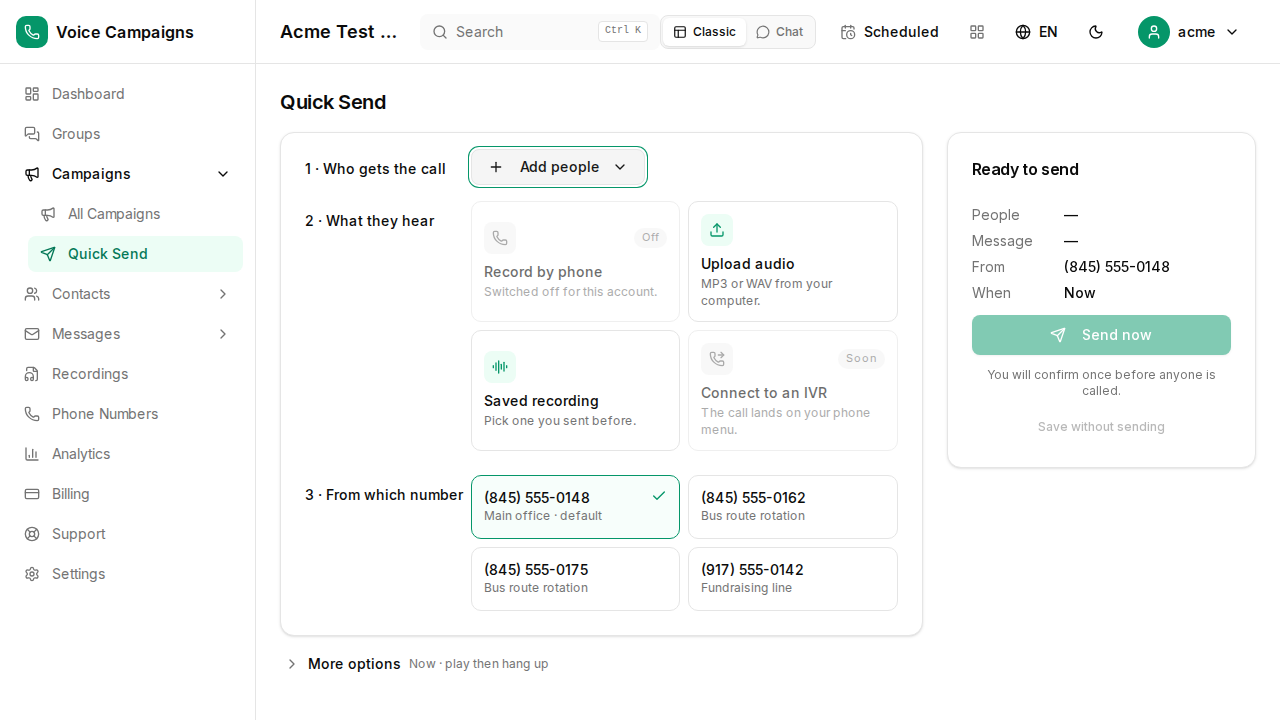
Send in one screen
Who gets the call, what they hear, which number it comes from — then Send. Everything else stays one level down until you need it.
- Paste numbers or pick a group
- Record by phone, upload a file, or type to voice
- Send from any number you own
- You confirm once before anyone is called
Live board
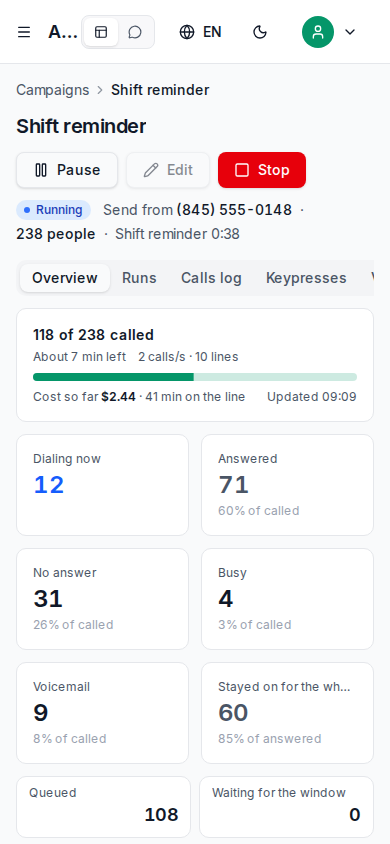
Watch every call as it happens
Answered, no answer, busy, voicemail — and who stayed on the line for the whole message. Pause or stop with one tap.
- Dialing now, answered, no answer, busy, voicemail — live
- Who stayed on the line for the whole message
- Pause, stop, or send again to no-answers
- The same board on your phone
Call-backs
When they call back, they hear something
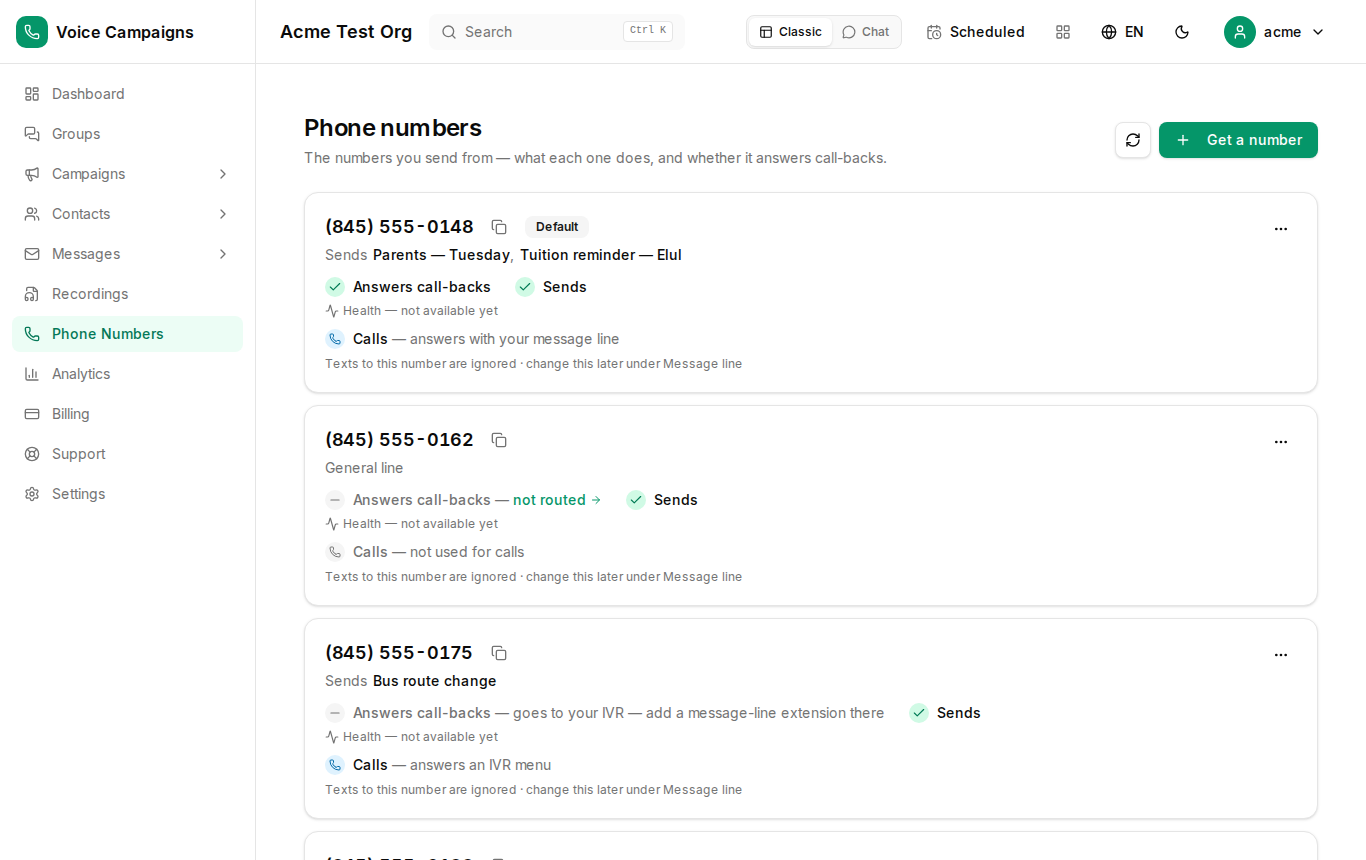
Every number you send from can answer call-backs with your message line — the recording, a menu, or your office.
- Missed the call? They call back and hear the message
- A key press reaches your office or leaves a voice reply
- Voice replies land in your inbox
- Works on every number you own
Getting started
Up and running in three steps
Create your account
Takes about two minutes.
Get a number
Pick a number you like — it is the one your calls come from.
Send your first campaign
Pick the people and the recording, press Send — then watch the board.
Pricing
Pay for the minutes you use
Calls are billed per minute from your credit. Every rate on this page comes from the system's own rate card.
Every account includes
Good to know
Questions & answers
The things everyone asks — answered straight.
No. It is a regular phone call — the phone rings, they answer, they hear your recording.
About two minutes: create your account, get a number, pick the people and the recording, press Send.
A number you own. You choose it on the Send page, and people can call it back.
Calls are billed per minute from your credit. The rate card on this page comes from the system; if it is empty, ask us and we send it.
Your message line answers: the recording, a menu, or a transfer to your office. Voice replies land in your inbox.
Yes — the live board shows every call and its outcome as it happens, and the report keeps it: answered, no answer, busy, voicemail, and who stayed on the line for the whole message.
Yes — one tap on the campaign: Resend to no-answers.
Add them to Blocked numbers. During a call, a key press can do it for them.
Yes — invite users and decide exactly what each person can do.
Yes. You call people who agreed to hear from you, inside calling hours, and you honour Blocked numbers. The calling rules page explains it.
Ready to send your first campaign?
Create your account and get a number in minutes.